This page has translation options to support accessibility for diverse audiences. This includes automated translations, which may not always be accurate. Some words and phrases may lose meaning or be interpreted differently when translated, especially colloquialisms, idioms, slang, and culturally specific references.
For critical information, we recommend referring to the English version or getting help from a native speaker or professional interpreter.
Listen to our website in your language
Every page of our website includes a tool called ReadSpeaker.
It lets you:
- listen to the text being read out loud (English)
- translate the text into one of 29 languages
- hear the translated text read out to you.
To use the translation option:
- Highlight the text you want to translate.
- When text is highlighted, a pop-up menu will appear. Select the Translate button.
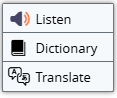
- Select a language by choosing one from the list or using the search box.
- A pop-up window will open. Select the Play button at the top of the window to hear the text read out to you in that language.
Speak to us using an interpreter
You can contact the NDIS Commission using a free interpreter service.
For NDIS participants
Call TIS National (Translating and Interpreting Services National) on 131 450.
Ask them to contact us on 1800 035 544.
- TIS National provides interpreters in more than 150 languages.
- This is a free service for NDIS participants.
For First Nations languages
If you need an Aboriginal interpreter, speak to:
- your local area coordinator (LAC)
- NDIS planner
- support coordinator
- remote community connector.
For NDIS providers
Registered NDIS providers must support participants who need an interpreter.
Learn how to register and access funded interpreting services: Language interpreting services for providers.
Translate pages using Chrome browser
If you use Google Chrome, you can translate any web page automatically.
This feature is part of the Chrome browser – it is not something we can control.
You can use it on desktop and mobile.
Learn more about how to translate pages and change Chrome languages.
Other accessible formats and resources
Easy Read
Easy Read is a way of presenting information using:
- simple language
- pictures
- plenty of white space.
This format helps people with:
- intellectual disability
- low literacy
- languages other than English.
Learn more about Easy Read resources.
See the NDIS Commission’s approach to accessibility.